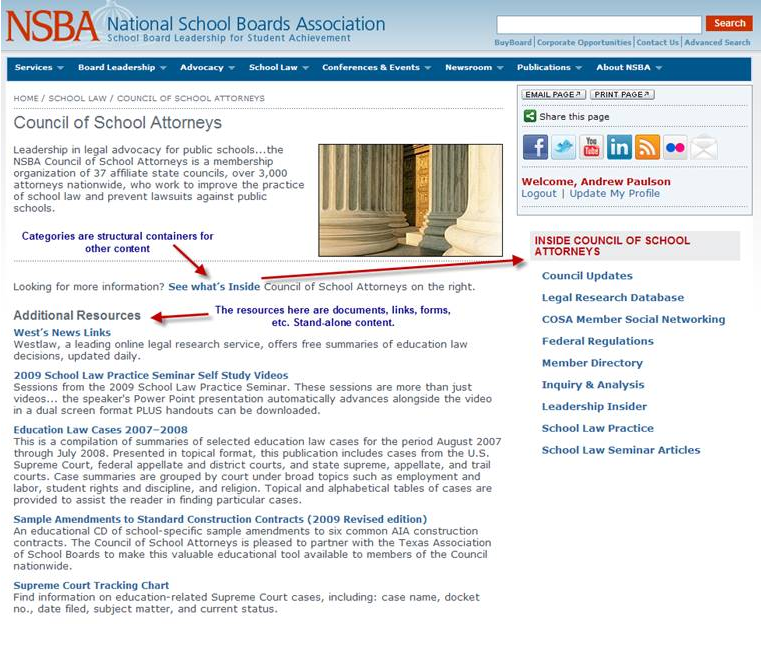
Recently, we rolled out a template change to www.nsba.org. This change applies to most category pages. For those of you unfamiliar with NSBA’s CMS, a category is essentially a page that behaves like a folder. It contains other documents. That is its primary purpose—to display the content that exists within itself. See the image below for an example.
The Council of School Attorneys homepage is a category. This category/folder contains documents, links, and other categories (sub-folders). However, the sub-folders themselves are, again, primarily used to organize more content.
With that in mind, I would like to announce that we have updated our category templates so that sub-categories will now appear on the right sidebar ONLY. The Inside This Section area on the sidebar is a navigational element used to display all the relative sub-categories (sub-folders) of the category page you are currently viewing. There you can always see whether a deeper level of information is available within a category/folder.
By deeper I mean—
- Council of School Attorneys
Each sub-category/sub-folder takes you deeper within the COSA website and thus more targeted information. This is how you navigate deeper within an area of our website (beyond the two levels available via the top navigation menu). To navigate back out, you can user your browser back button or check out the breadcrumbs that appear just above any webpage’s title.
So, the second part of this change deals with the “Resources” part of the page. You will now see that this area is called Additional Resources. That is by default. That text can now be edited but contact me before attempting to do so. These Additional Resources will now include any children (content within the category) EXCEPT categories. Again, categories will only be displayed in the sidebar.
Why did we do this? To clean up our website. Many pages had a long list/mix of documents, links, categories, etc. This change will eliminate some page scroll. And by trimming the list under Additional Resources some, we make it easier for users to find content within those (now shorter) lists. We also have made the distinction between navigational/organizational/structural elements of our website and resource/document content more obvious to the user.
I’ll stop talking now. Any questions, let me know